| Communication |
| Jeweler communication technology |
Proprietary wireless communication technology to transmit commands, alarms, and events.
Key features:
- Two-way communication.
- Advanced anti-sabotage.
- Block encryption featuring a dynamic key.
- Instant notifications.
- Remote configuration via the Ajax apps.
|
| Radio frequency bands |
866.0 - 866.5 MHz
868.0 - 868.6 MHz
868.7 - 869.2 MHz
905.0 - 926.5 MHz
915.85 - 926.5 MHz
921.0 - 922.0 MHz
Depence on the sales reaction |
| Maximum effective radiated power (ERP) |
up to 25 mW
Automatic power control to reduce power consumption and radio interference. |
| Radio signal modulation |
GFSK |
| Radio signal range |
Up to 1,700 m
up to 5,500 ft
Between the detector and a hub (or radio signal range extender) in an open space. |
| Encrypted radio communication |
All the data stored and transmitted are protected by block encryption featuring a dynamic key. |
| Frequency hopping |
Radio communication uses frequency hopping to prevent interception and jamming. |
| Key features |
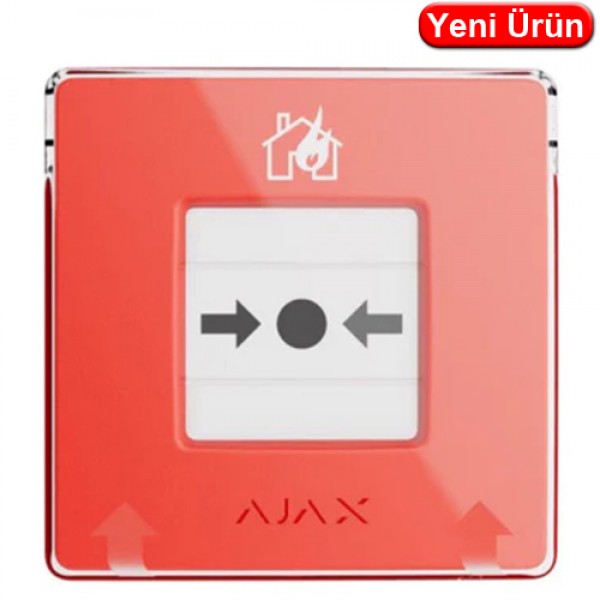
| Resettable frangible element |
activates the button
When the central part (frangible element) is pressed, the button depresses inward, triggering an alarm or initiating a scenario. Two yellow stripes appear at the top and bottom, indicating the device's state. |
| Operating modes |
fire alarm
trigger scenario
With appropriate settings, it activates an alarm or controls Ajax automation devices. |
| LED status indication |
fire alarm
malfunctions
The LED indicator on the device enclosure lights up when a fire alarm is triggered or malfunctions are detected. |
| Interconnected fire detectors alarms |
by pressing the button
By pressing the frangible element, fire detectors in the system trigger the built-in sirens |
| Critical alerts |
The system can activate intrusion sirens and send audible alarm notifications to users, even if the sound is muted, the Do Not Disturb mode is on, or headphones are connected |
| Protection against accidental presses |
Lift the transparent lid to access the frangible element. The lid protects against false button presses |
| Alarm transmission to CMS |
can be disabled |
| Special tool (key) |
| Reset button |
after pressing
To reset the button, insert the special tool into the corresponding hole. |
| Hole in the enclosure |
to hang on a ring from a keychain
The person responsible for fire safety can carry the special tool on their keychain. |
| Convenient dismantling |
The special tool opens the lock to dismantle the device from SmartBracket mounting panel |
| Recommendations |
It is recommended to install the button in easily accessible places at a height of 1.4 m.
The device is designed for indoor installation only. |
| Sabotage protection |
| Tampering alarm |
Notifies on attempts to detach the button from the surface or remove it from the mounting panel |
| Protection against spoofing |
device authentication |
| Detection of communication failure |
after 36 s
The detection time depends on the Jeweler or Jeweller/Fibra settings |
| Power supply |
| Batteries |
2 × CR123A
Pre-installed. With typical use (one press lasting 1 minute per week), the batteries can last up to 7 years. |
| Enclosure |
| Color |
Red |
| Dimension |
102 × 104 × 39 mm
4.02″ × 4.09″ × 1.53″ |
| Weight |
214 g
7.55 oz |
| Operating temperature range |
from 0 °C to +50 °C
from 32°F to 122°F |
| Operating humidity |
up to 80% |
| Complete set |
ManualCallPoint (Red) Jeweller
SmartBracket mounting panel
Special tool (key)
2 × CR123A battery (pre-installed)
Installation kit
Quick start guide |
| Warranty |
24 months |